Logo Logo en
  • iRidi Pro
    Основные компоненты
    • Приложение i3 Pro
    • iRidi Pro Server
    • iRidi Studio
    • iRidium studio v. 1.3.8 (устаревшая версия)
    Java Script в iRidi
    • Руководство
    • Справочник
    • Примеры
    • JS драйвера
    другие
    • Личный Кабинет
    • iRidium Cloud
    • iRidium Transfer
    • Push-уведомления
    • Лучшая практика
    Лицензирование
    • Лицензирование и передача проекта
    • Оффлайн-лицензирование
    • Активация iRidi Pro Server
  • Продукты
    i3 lite
    • Приложение i3 lite
    • Регистрация и лицензирование
    • Сервер
    • Модули
    KNX Home Server
    • Приложение i3 KNX
    • KNX Home Server
    BUS77 HOME SERVER
    • Приложения Bus77 Home и Bus77 Lite
    • Bus77 Home Server
    Решения
    • BYOD - решение для гостиниц
    • Портал жителя - решение для МКД
    iRidi SCADA
    • iRidi SCADA
  • Bus77
    НАСТРОЙКА BUS77
    • Основы Bus77
    • Приложения Bus77 Home и Bus77 Lite
    • Работа с драйвером Bus77 в iRidi Studio
    • Настройка шины Bus77 в iRidi Studio
    ПРОТОКОЛ BUS77
    • Характеристики CAN (Bus77)
    • Описание протокола
    • Исходники на GitHub
    ОБОРУДОВАНИЕ BUS77
    • Каталог Bus77 Pro
    • Каталог Bus77 Lite
  • Поддерживаемое оборудование
    Драйверы
    • Список драйверов
    • ProAV драйвера
    • AV & Custom Systems
    • JS драйвера
    • Сторонние драйвера и фриланс
    Протоколы и интерфейсы
    • Голосовое управление
    • 1-Wire
    • BACnet IP
    • Bus77
    • KNX
    • KNX IP BAOS
    • Weinzierl kBerry
    • Microsoft Exchange
    • Modbus
    • MQTT
    • NFC
    • ODBC
    • Onvif
    • SIP
    • SNMP
    • Wake On Lan
    • Z-Wave
    • ZigBee
    Производители
    • AMX
    • AVCiT
    • Beckhoff ADS
    • Biamp Tesira
    • Bluesound
    • Casambi
    • BSS Harman
    • Clipsal
    • ControlArt 7Port
    • Crestron
    • DigiBird
    • Domintell
    • Duotecno
    • EIDE
    • EPSNET
    • Global Cache
    • HDL Buspro
    • Helvar
    • IEAST
    • INELS BUS
    • INELS Wireless
    • Intesis
    • Kleger
    • Kramer VIA
    • Kramer 3000
    • Larnitech
    • Legrand Netatmo
    • LG TV
    • Lutron
    • Lutron Homeworks QS
    • MyHome
    • Nest
    • Novastar
    • Panasоnic PTZ
    • Philips Dynalite
    • PJLink
    • Satel
    • SamsungTV
    • Sonos
    • Somfy
    • SpinetiX
    • Televic Conference
    • TIS
    • Tion
    • URRI
    • Velbus
    • Velocio
    • Vinteo
    • WyreStorm
    • WiiM
    • Xicato
    • Yamaha
    • ZONT
    • Z-Wave.me
    Протестированное оборудование
    • Панель HDL S57
    • Панель HDL S10
    • SIP-домофон
    • Akuvox
    • Arlight
    • Divus
    • QBic TD-1050 PRO
    • QBic TD-1060 Slim
    • QBic TD-1070
    • Sigur
    • Uni-Ubi
    • Velocio
  • Оборудование iRidi

    Серверы
    • HS Сервер
    • ProAV Control Processor Basic
    • ProAV Control Processor Advanced
    • Спецификация контроллеров UMC
    • Настройка контроллера UMC C2
    • Настройка контроллера UMC C3
    • Настройка контроллера HDL IntelliCenter 2 (UMC C4)
    Модули расширения
    • I-PX-RS1
    • I-PX-RS4
    • I-PX-IR3
    KNX
    • KNX Home Server
    • KNX IP Interface
    Панели управления
    • iRidium Panel 7
    • Touch Panel P3
    • Touch Panel P6
    • Touch Panel P8
    • Touch Panel P10
    • Tabletop Touch Panel 10
    • AV Remote Control
    ОБОРУДОВАНИЕ BUS77
    • Каталог Bus77 Pro
    • Каталог Bus77 Lite
    • Differences
iRidium mobile web-site
Содержание
    Инструменты‌
    • Сведения о странице
    • Постоянная ссылка
    • Версия для печати
    • Спецстраницы
    • Связанные правки
    • Ссылки сюда
    Login / Create Account
    Материал из for iRidium developers
    Перейти к: навигация, поиск
    Эта страница является переводом страницы D09. Перевод выполнен на 100%.

    Hardware ⇒ D09

    Содержание

    • 1 D09 Master switch, double-key, four-button
      • 1.1 Description
      • 1.2 Size
        • 1.2.1 With a frame
        • 1.2.2 Without a frame
        • 1.2.3 Without a frame and metal support
      • 1.3 Terminals
      • 1.4 Special features
      • 1.5 Connection and installation
      • 1.6 Current repairs
      • 1.7 Storage, transportation and service life
      • 1.8 Manufacturer's warranty
      • 1.9 Completeness
      • 1.10 Possible malfunctions
      • 1.11 Disposal
      • 1.12 Safety

    D09 Master switch, double-key, four-button

    The documentation was updated on 29.12.2023

    Description

    The device consider the state of the light sources in the room and can turn off all the lights in the room if at least one of the sources is on. It also measures the ambient temperature.

    Parameter Value
    Product code D09
    Sensors temperature sensor
    Temperature range 0...+50 °C
    Control 4 buttons
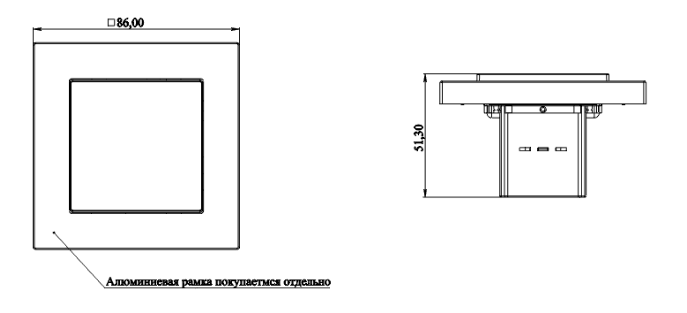
    Dimension in mm, W x H x D 86 x 86 x 51,3 with a frame (purchased separately)
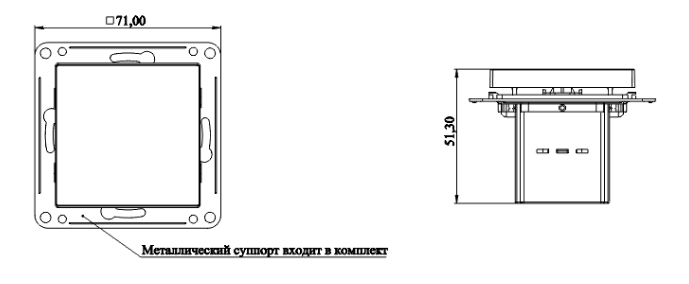
    71 x 71 x 51,3 with a metal support (provided)
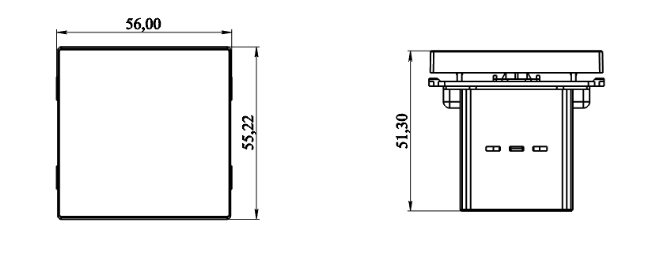
    56 x 55,22 x 51,3
    Body material plastic
    Protection index IP20
    Mounting in a pattress box, 65x60 mm.


    Use cases D09 App.png

    Size

    With a frame

    D08 size1.png

    Without a frame

    D08 size2.png

    Without a frame and metal support

    D08 size3.png

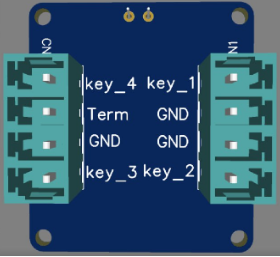
    Terminals

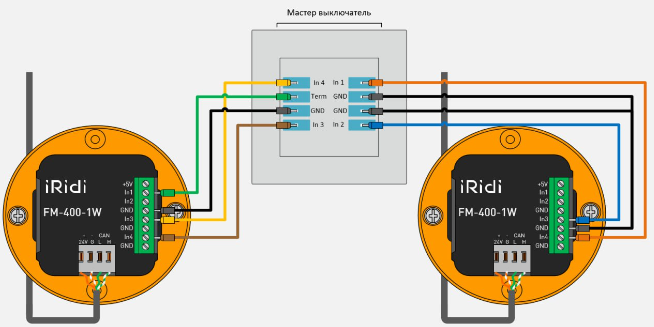
    D09 clemms.png

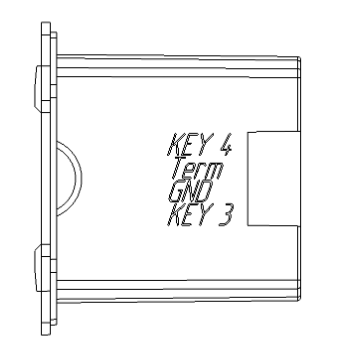
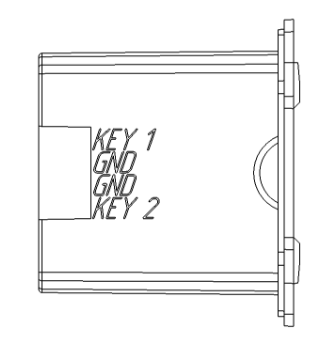
    Right view Left view
    D09 rightside.png
    D08 leftside.png

    Special features

    • It can be a networked temperature sensor for thermostats

    Connection and installation
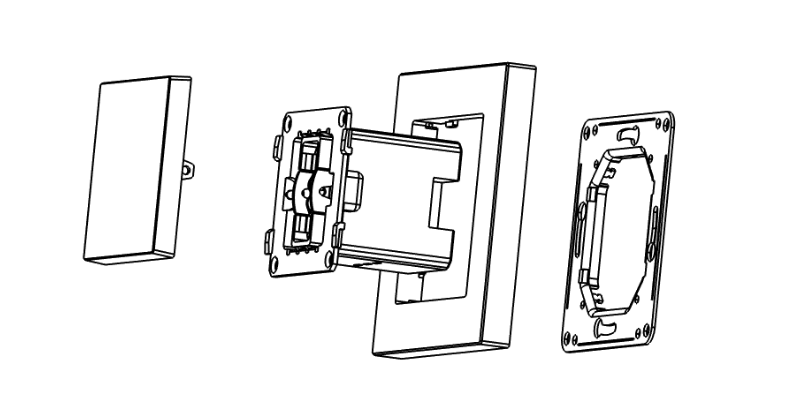
    D08 Montage.png

    • The master switch consists of the block with keys, a decorative frame and a mounting metal support. Attach the metal support to a 68 mm socket using self-tapping screws, screw the switch block to it through four holes in the corners, while pressing the decorative frame, then install the key.
    • Connect the cable according to the markings on the case.
    • To connect the switch master to DM-306/FM-400/FM-800, it is recommended to use UTP CAT5 wire with a core section of at least 0.52 mm² and a characteristic wave impedance of no more than 9.4 Ohms per 100 meters.
    • Installation and maintenance work should only be carried out by those who are competent to do the work in compliance with safety precautions.

    Current repairs

    If a fault is detected during operation you must turn off the device and call service personnel.  The device is repaired and serviced by the manufacturer's dealer within the warranty period.
    

    Storage, transportation and service life

    Products must be stored in packaging at temperatures from 0℃ to +40℃ and a relative air humidity of 80% in heated and naturally ventilated warehouses, in air-conditioned warehouses, in the absence of aggressive impurities, conductive dust, acid and alkali vapors, as well as gases that cause corrosion and destroy insulation. During storage, sudden fluctuations in air temperature (more than 3℃/min) and humidity (more than 5%/min) are not allowed.
    Transportation of products must be carried out in packaged form in containers, closed railway cars, heated sealed compartments of aircraft and holds, as well as by road transport protected from precipitation over any distance at temperatures from -50℃ to +50℃, with relative air humidity up to 100% - at 25℃. When transporting products, provide protection from dust and precipitation.

    Manufacturer's warranty

    The warranty period is 2 years (24 months) from the date of sale.

    Without a note of sale the warranty period starts from the date of manufacture. Manufacturer's warranty does not cover the following: mechanical damage of the device; damage caused by liquids; damage caused by abnormal power supplies; damage caused by violation of device connection rules; modifications or changes to the device or its connection diagrams by the buyer or third parties without the consent of the manufacturer; use for purposes other than those for which designed; failure to comply with conditions of transportation, storage, operation, installation of the device and maintenance of the premises established in this passport and operational documentation, as well as the occurrence of other circumstances beyond the control of the manufacturer.
    The average service life of the product is at least 5 years.

    Completeness

    Master switch 2..................................................................................................................................1pc.
    Package................................................................................................................................................1pc.
    Connectors............................................................................................................................................2 pc.
    Screws...................................................................................................................................................4 pc.

    Possible malfunctions

    Malfunction Probable cause Debugging
    The device does not work No connection Check the cable for serviceability; check the connection of the cable and connectors; check that the cable is connected correctly to the connector according to the diagram on the case
    Out of order Send for warranty repair

    Disposal

    At the end of its service life, the product must be disposed of in accordance with the laws of the country of stay.

    Safety

    WARNING: It is not allowed to use the device in systems responsible for the safety of people, animals, material assets, as well as in systems whose failure will lead to a violation of safety.


    Источник — «https://dev.iridi.com/index.php?title=D09/en&oldid=138746»
    About us
    Company
    Team
    History
    Philosophy
    Rewards
    Partnership
    Our partner
    Partnership Programs
    Apply for partnership
    products
    iRidium pro
    iRidium lite
    iRidium gate
    iRidium server
    Loads
    iRidium pro
    iRidium lite
    Other version
    Marketing materials
    Support
    On-line courses/Video
    Recommended equipment
    Other version
    iRidium pro
    Documentation
    FAQ
    Forum
    iRidium lite
    Documentation
    Forum
    Projects
    Standart projects
    Smart buildings
    Smart house
    Special solution
    Find a dealer
    News
    Youtube
    Twitter
    VK
    Logo
    contact@iridi.com
    +7 (499) 322-73-29

    Privacy policy